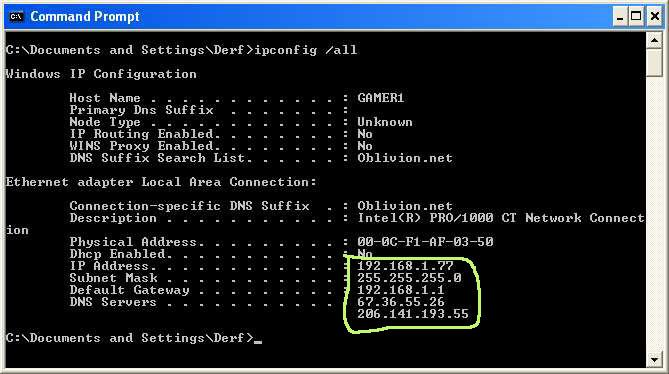
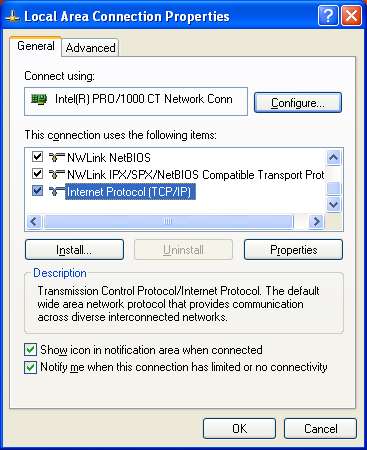
Write down the two DNS Server numbers. The next thing is to decide what number you will use for for your Static IP address. The number 192.168.1.1 is normally used as your routers address unless someone changed that. Use 192.168.1.xxx, replacing xxx with any number from 2-255. Open your control panel, select network connections, right click your network card, select properties. Select Internet Protocol (TCP/IP) Click properties in the properties window
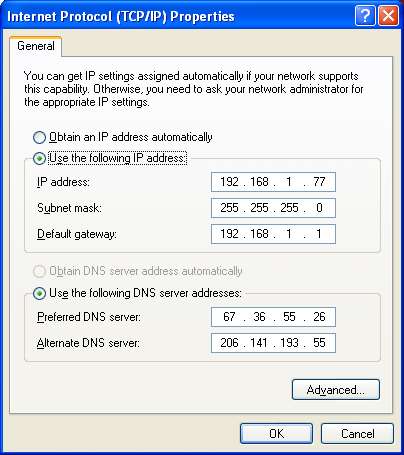
When the next window select: Use the following IP address. Now enter the IP address you chose 192.168.1.xxx. The subnet mask will always be 255.255.255.0. The default gateway will be your routers address, 192.168.1.1 unless you have changed it Next select: Use the following DNS server addresses: Enter the two DNS server address you wrote down when you ran IPconfig /all. After entering the information click ok then check to make sure your Internet works. If you can surf the web then you have successfully set a static IP address.